---
title: Creating and Managing Campaigns
description: How to Create and Manage Campaigns in WellTender (Campaigns allow for users to group a bunch of issues with an ongoing campaign such as a workover)
---
[Skip to content](https://support.resnet.ai/migration/adding-and-managing-campaigns#main-content)
English
Show submenu for translations
.jpg?width=6782&height=2762&name=primary_logo%20(1).jpg)
Open main navigation
Close main navigation
- English
Show submenu for translations
- Contact us
Contact us
How can we help you?
- There are no suggestions because the search field is empty.
1. [SUPPORT CENTER](https://support.resnet.ai/migration?hsLang=en)
2. [ResNet For Office](https://support.resnet.ai/migration/resnet-for-office?hsLang=en)
3. [Campaigns](https://support.resnet.ai/migration/resnet-for-office?hsLang=en#campaigns)
# Creating and Managing Campaigns
## How to Create and Manage Campaigns in WellTender (Campaigns allow for users to group a bunch of issues with an ongoing campaign such as a workover)
### Adding a Campaign
1\. **Click** on Campaigns tab, in between Issues and Resources.
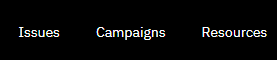
2\. All Campaigns will appear in table view.
3\. To Create a new Campaign, **click** on the green  button.
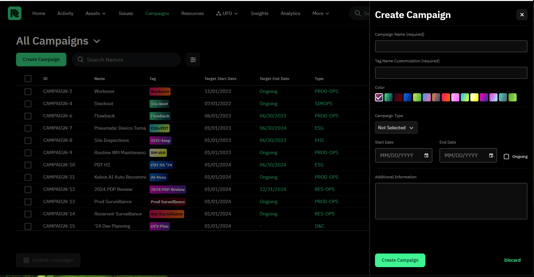
4\. Fill in the information and add any additional text, and then **click** the green  button.
5\. The saved Campaign will appear in the table.
---
### Managing a Campaign
6\. To view the Campaign, **click** on the Campaign to navigate to its page.
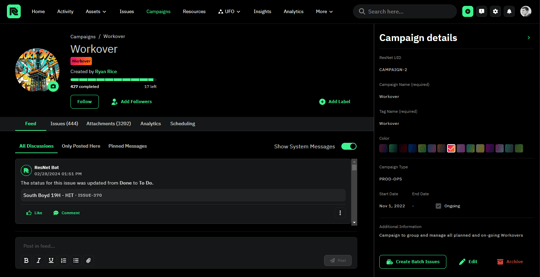
7\. The Campaign page includes:
a. Feed (Any dialogue or status updates of an Issue associated with the campaign)
b. Issues (Any Issues associated with the Campaign)
c. Attachments (Any pdfs or photos associated with the Campaign)
d. Analytics (Insights on how the Campaign is going (issues closed, performance, etc.))
e. Scheduling (Gantt Chart view showing Issues scheduled for Campaign)
---
Add Custom Fields to Campaign
- [ResNet For Field](https://support.resnet.ai/migration/resnet-for-field?hsLang=en)
- [ResNet For Office](https://support.resnet.ai/migration/resnet-for-office?hsLang=en#main-content)
- [Admin](https://support.resnet.ai/migration/resnet-for-office?hsLang=en#admin)
- [Home](https://support.resnet.ai/migration/resnet-for-office?hsLang=en#home)
- [Assets](https://support.resnet.ai/migration/resnet-for-office?hsLang=en#assets)
- [Issues](https://support.resnet.ai/migration/resnet-for-office?hsLang=en#issues)
- [Campaigns](https://support.resnet.ai/migration/resnet-for-office?hsLang=en#campaigns)
- [Resources](https://support.resnet.ai/migration/resnet-for-office?hsLang=en#resources)
- [Field Dispatch Console](https://support.resnet.ai/migration/resnet-for-office?hsLang=en#field-dispatch-console)
- [Gamification](https://support.resnet.ai/migration/resnet-for-office?hsLang=en#gamification)
- [Routes](https://support.resnet.ai/migration/resnet-for-office?hsLang=en#routes)
- [User Groups](https://support.resnet.ai/migration/resnet-for-office?hsLang=en#user-groups)
- [Credentials](https://support.resnet.ai/migration/resnet-for-office?hsLang=en#credentials)
- [Forms](https://support.resnet.ai/migration/resnet-for-office?hsLang=en#forms)
- [Admin Panel](https://support.resnet.ai/migration/resnet-for-office?hsLang=en#admin-panel)
- [Filtering](https://support.resnet.ai/migration/resnet-for-office?hsLang=en#filtering)
- [Custom Fields](https://support.resnet.ai/migration/resnet-for-office?hsLang=en#custom-fields)
- [Integrations](https://support.resnet.ai/migration/integrations?hsLang=en)
- [Release Notes](https://support.resnet.ai/migration/release-notes?hsLang=en#main-content)
- [Feature Releases](https://support.resnet.ai/migration/release-notes?hsLang=en#feature-releases)
- [FAQs](https://support.resnet.ai/migration/faqs?hsLang=en)
- [Onboarding](https://support.resnet.ai/migration/onboarding?hsLang=en#main-content)
- [Office](https://support.resnet.ai/migration/onboarding?hsLang=en#office)
- [Field](https://support.resnet.ai/migration/onboarding?hsLang=en#field)
- [Workflow Automation](https://support.resnet.ai/migration/workflow-automation?hsLang=en#main-content)
- [Build Integrations](https://support.resnet.ai/migration/workflow-automation?hsLang=en#build-integrations)
- [Ready-to-use-components](https://support.resnet.ai/migration/workflow-automation?hsLang=en#ready-to-use-components)
- [Example Workflows](https://support.resnet.ai/migration/workflow-automation?hsLang=en#example-workflows)
- [Documentation](https://support.resnet.ai/migration/documentation?hsLang=en)
[.jpg?width=6782&height=2762&name=primary_logo%20(1).jpg)](https://support.resnet.ai/?hsLang=en)
[mailto:email@email.com](mailto:email@email.com)
Copyright © 2026, ResNet AI