---
title: App Overview for Field Users
description: Going through the different flows of a field user
---
[Skip to content](https://support.resnet.ai/migration/app-overview-for-field-users#main-content)
English
Show submenu for translations
.jpg?width=6782&height=2762&name=primary_logo%20(1).jpg)
Open main navigation
Close main navigation
- English
Show submenu for translations
- Contact us
Contact us
How can we help you?
- There are no suggestions because the search field is empty.
1. [SUPPORT CENTER](https://support.resnet.ai/migration?hsLang=en)
2. [ResNet For Field](https://support.resnet.ai/migration/resnet-for-field?hsLang=en)
# App Overview for Field Users
## Going through the different flows of a field user
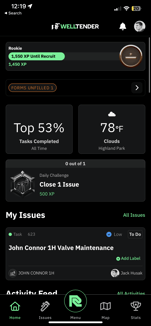
### Home Screen
On The Home Screen you can **see** the following:
a. XP Progression
b. Forms that are requested to be filled (Service Request, JSA, etc.)
c. Daily Challenges (Challenges that reward XP)
d. My Issues (Issues that have been assigned to you)
e. Activity Feed (Any Dialogue in the company)
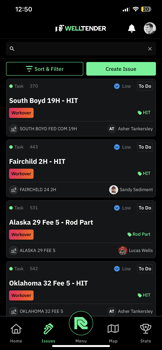
### Issues
On the Issues Tab, you can
a. **Create** an Issue
b. **View** all Issues
c. **Close** an Issue
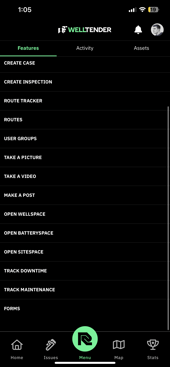
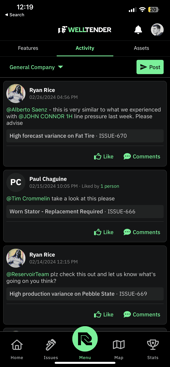
### ResNet Menu
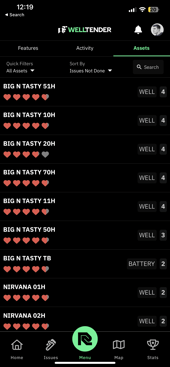
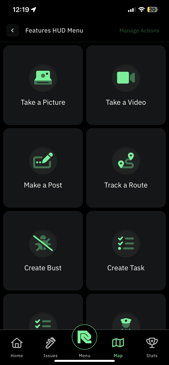
On the ResNet Menu, you can
a. **Access** any features needed for job use
b. **Read** the activity feed and **post** if needed
c. **Access** WellSpace (Historian of company wells)
### Map
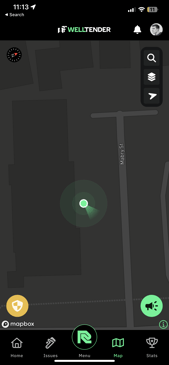
On the map you can
a. **Track** a Route via the safety shield
b. **Use** Fat Finger Mode via the speaker (Fat finger mode allows users to access certain features with bigger buttons)
### Stats
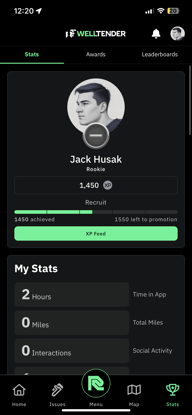
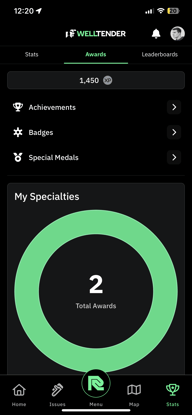
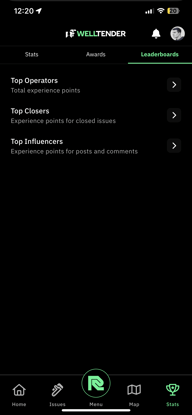
On the Stats Page you can **view**
a. Your XP
b. Tracked Routes
c. Stats on Issues
d. Leaderboards
e. Achievements
f. Special Medals and Badges
- [ResNet For Field](https://support.resnet.ai/migration/resnet-for-field?hsLang=en)
- [ResNet For Office](https://support.resnet.ai/migration/resnet-for-office?hsLang=en#main-content)
- [Admin](https://support.resnet.ai/migration/resnet-for-office?hsLang=en#admin)
- [Home](https://support.resnet.ai/migration/resnet-for-office?hsLang=en#home)
- [Assets](https://support.resnet.ai/migration/resnet-for-office?hsLang=en#assets)
- [Issues](https://support.resnet.ai/migration/resnet-for-office?hsLang=en#issues)
- [Campaigns](https://support.resnet.ai/migration/resnet-for-office?hsLang=en#campaigns)
- [Resources](https://support.resnet.ai/migration/resnet-for-office?hsLang=en#resources)
- [Field Dispatch Console](https://support.resnet.ai/migration/resnet-for-office?hsLang=en#field-dispatch-console)
- [Gamification](https://support.resnet.ai/migration/resnet-for-office?hsLang=en#gamification)
- [Routes](https://support.resnet.ai/migration/resnet-for-office?hsLang=en#routes)
- [User Groups](https://support.resnet.ai/migration/resnet-for-office?hsLang=en#user-groups)
- [Credentials](https://support.resnet.ai/migration/resnet-for-office?hsLang=en#credentials)
- [Forms](https://support.resnet.ai/migration/resnet-for-office?hsLang=en#forms)
- [Admin Panel](https://support.resnet.ai/migration/resnet-for-office?hsLang=en#admin-panel)
- [Filtering](https://support.resnet.ai/migration/resnet-for-office?hsLang=en#filtering)
- [Custom Fields](https://support.resnet.ai/migration/resnet-for-office?hsLang=en#custom-fields)
- [Integrations](https://support.resnet.ai/migration/integrations?hsLang=en)
- [Release Notes](https://support.resnet.ai/migration/release-notes?hsLang=en#main-content)
- [Feature Releases](https://support.resnet.ai/migration/release-notes?hsLang=en#feature-releases)
- [FAQs](https://support.resnet.ai/migration/faqs?hsLang=en)
- [Onboarding](https://support.resnet.ai/migration/onboarding?hsLang=en#main-content)
- [Office](https://support.resnet.ai/migration/onboarding?hsLang=en#office)
- [Field](https://support.resnet.ai/migration/onboarding?hsLang=en#field)
- [Workflow Automation](https://support.resnet.ai/migration/workflow-automation?hsLang=en#main-content)
- [Build Integrations](https://support.resnet.ai/migration/workflow-automation?hsLang=en#build-integrations)
- [Ready-to-use-components](https://support.resnet.ai/migration/workflow-automation?hsLang=en#ready-to-use-components)
- [Example Workflows](https://support.resnet.ai/migration/workflow-automation?hsLang=en#example-workflows)
- [Documentation](https://support.resnet.ai/migration/documentation?hsLang=en)
[.jpg?width=6782&height=2762&name=primary_logo%20(1).jpg)](https://support.resnet.ai/?hsLang=en)
[mailto:email@email.com](mailto:email@email.com)
Copyright © 2026, ResNet AI