---
title: Creating and Managing Form Fills
description: How to Create and Manage Form Fills for Field Users
---
[Skip to content](https://support.resnet.ai/migration/creating-and-managing-form-fills#main-content)
English
Show submenu for translations
.jpg?width=6782&height=2762&name=primary_logo%20(1).jpg)
Open main navigation
Close main navigation
- English
Show submenu for translations
- Contact us
Contact us
How can we help you?
- There are no suggestions because the search field is empty.
1. [SUPPORT CENTER](https://support.resnet.ai/migration?hsLang=en)
2. [ResNet For Office](https://support.resnet.ai/migration/resnet-for-office?hsLang=en)
3. [Forms](https://support.resnet.ai/migration/resnet-for-office?hsLang=en#forms)
# Creating and Managing Form Fills
## How to Create and Manage Form Fills for Field Users
### Creating a Form
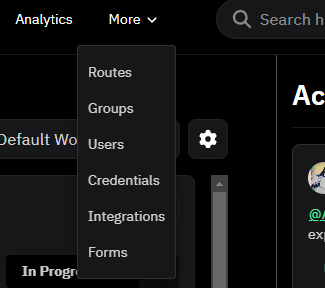
1\. From the top nav menu **click** on More, and then select 'Forms'.
2\. Saved forms will appear in Table View.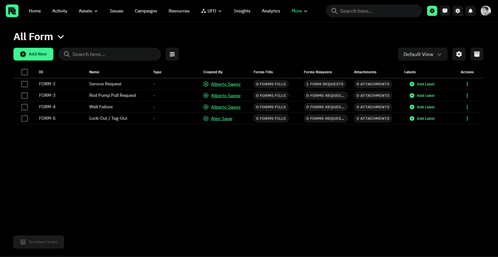
3\. To add a new form, **click** on .
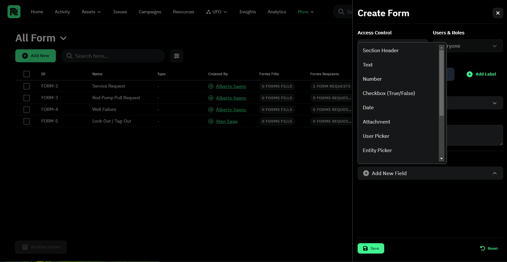
4\. Each form fill is determined by a key which are broken down into the following:
**\* NOTE**, Key must match the name with an underscore if there is more than one word) eg. Name is Cost Estimate (Number) and key should be cost\_estimate
a. **Text** (single line or multi line text description)
b. **Number** (hours, money, etc.)
c. **Checkbox** (True/False)
d. **Date**
e. **User Picker** (Company User Selection)
f. **Options Group** (Multiple questions)
e. **Entity Picker** (Asset, Site, Battery, etc.)
f. **Sketch** (Signature)
g. **Attachment** (PDF or photo)
5\. One finished **click** on the green  button.
---
### Managing a Form
1\. Once the form appears in table view, you can **click** on it to get to the specific form page.
2\. Here you can **navigate** to entries, and request a user to fill the form.
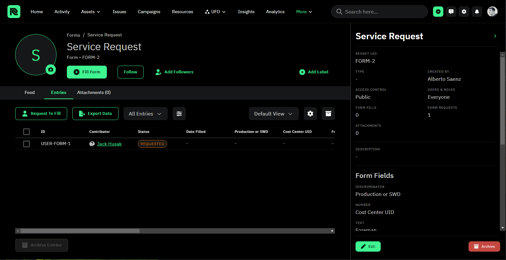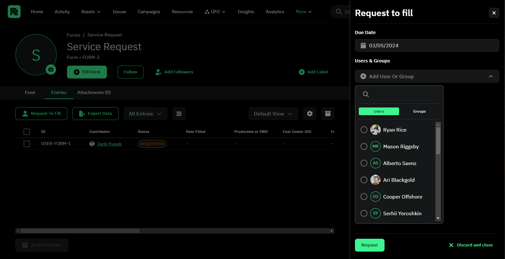
8\. **Select** your targeted user, and **click** on the green  button.
9\. The selected user will be notified of the form fill request on their WellTender app.
- [ResNet For Field](https://support.resnet.ai/migration/resnet-for-field?hsLang=en)
- [ResNet For Office](https://support.resnet.ai/migration/resnet-for-office?hsLang=en#main-content)
- [Admin](https://support.resnet.ai/migration/resnet-for-office?hsLang=en#admin)
- [Home](https://support.resnet.ai/migration/resnet-for-office?hsLang=en#home)
- [Assets](https://support.resnet.ai/migration/resnet-for-office?hsLang=en#assets)
- [Issues](https://support.resnet.ai/migration/resnet-for-office?hsLang=en#issues)
- [Campaigns](https://support.resnet.ai/migration/resnet-for-office?hsLang=en#campaigns)
- [Resources](https://support.resnet.ai/migration/resnet-for-office?hsLang=en#resources)
- [Field Dispatch Console](https://support.resnet.ai/migration/resnet-for-office?hsLang=en#field-dispatch-console)
- [Gamification](https://support.resnet.ai/migration/resnet-for-office?hsLang=en#gamification)
- [Routes](https://support.resnet.ai/migration/resnet-for-office?hsLang=en#routes)
- [User Groups](https://support.resnet.ai/migration/resnet-for-office?hsLang=en#user-groups)
- [Credentials](https://support.resnet.ai/migration/resnet-for-office?hsLang=en#credentials)
- [Forms](https://support.resnet.ai/migration/resnet-for-office?hsLang=en#forms)
- [Admin Panel](https://support.resnet.ai/migration/resnet-for-office?hsLang=en#admin-panel)
- [Filtering](https://support.resnet.ai/migration/resnet-for-office?hsLang=en#filtering)
- [Custom Fields](https://support.resnet.ai/migration/resnet-for-office?hsLang=en#custom-fields)
- [Integrations](https://support.resnet.ai/migration/integrations?hsLang=en)
- [Release Notes](https://support.resnet.ai/migration/release-notes?hsLang=en#main-content)
- [Feature Releases](https://support.resnet.ai/migration/release-notes?hsLang=en#feature-releases)
- [FAQs](https://support.resnet.ai/migration/faqs?hsLang=en)
- [Onboarding](https://support.resnet.ai/migration/onboarding?hsLang=en#main-content)
- [Office](https://support.resnet.ai/migration/onboarding?hsLang=en#office)
- [Field](https://support.resnet.ai/migration/onboarding?hsLang=en#field)
- [Workflow Automation](https://support.resnet.ai/migration/workflow-automation?hsLang=en#main-content)
- [Build Integrations](https://support.resnet.ai/migration/workflow-automation?hsLang=en#build-integrations)
- [Ready-to-use-components](https://support.resnet.ai/migration/workflow-automation?hsLang=en#ready-to-use-components)
- [Example Workflows](https://support.resnet.ai/migration/workflow-automation?hsLang=en#example-workflows)
- [Documentation](https://support.resnet.ai/migration/documentation?hsLang=en)
[.jpg?width=6782&height=2762&name=primary_logo%20(1).jpg)](https://support.resnet.ai/?hsLang=en)
[mailto:email@email.com](mailto:email@email.com)
Copyright © 2026, ResNet AI