---
title: December 2023
description: Interactive Scheduling (Gantt Chart)
---
[Skip to content](https://support.resnet.ai/migration/december-2023-feature-release#main-content)
English
Show submenu for translations
.jpg?width=6782&height=2762&name=primary_logo%20(1).jpg)
Open main navigation
Close main navigation
- English
Show submenu for translations
- Contact us
Contact us
How can we help you?
- There are no suggestions because the search field is empty.
1. [SUPPORT CENTER](https://support.resnet.ai/migration?hsLang=en)
2. [Release Notes](https://support.resnet.ai/migration/release-notes?hsLang=en)
3. [Feature Releases](https://support.resnet.ai/migration/release-notes?hsLang=en#feature-releases)
# December 2023
## Interactive Scheduling (Gantt Chart)
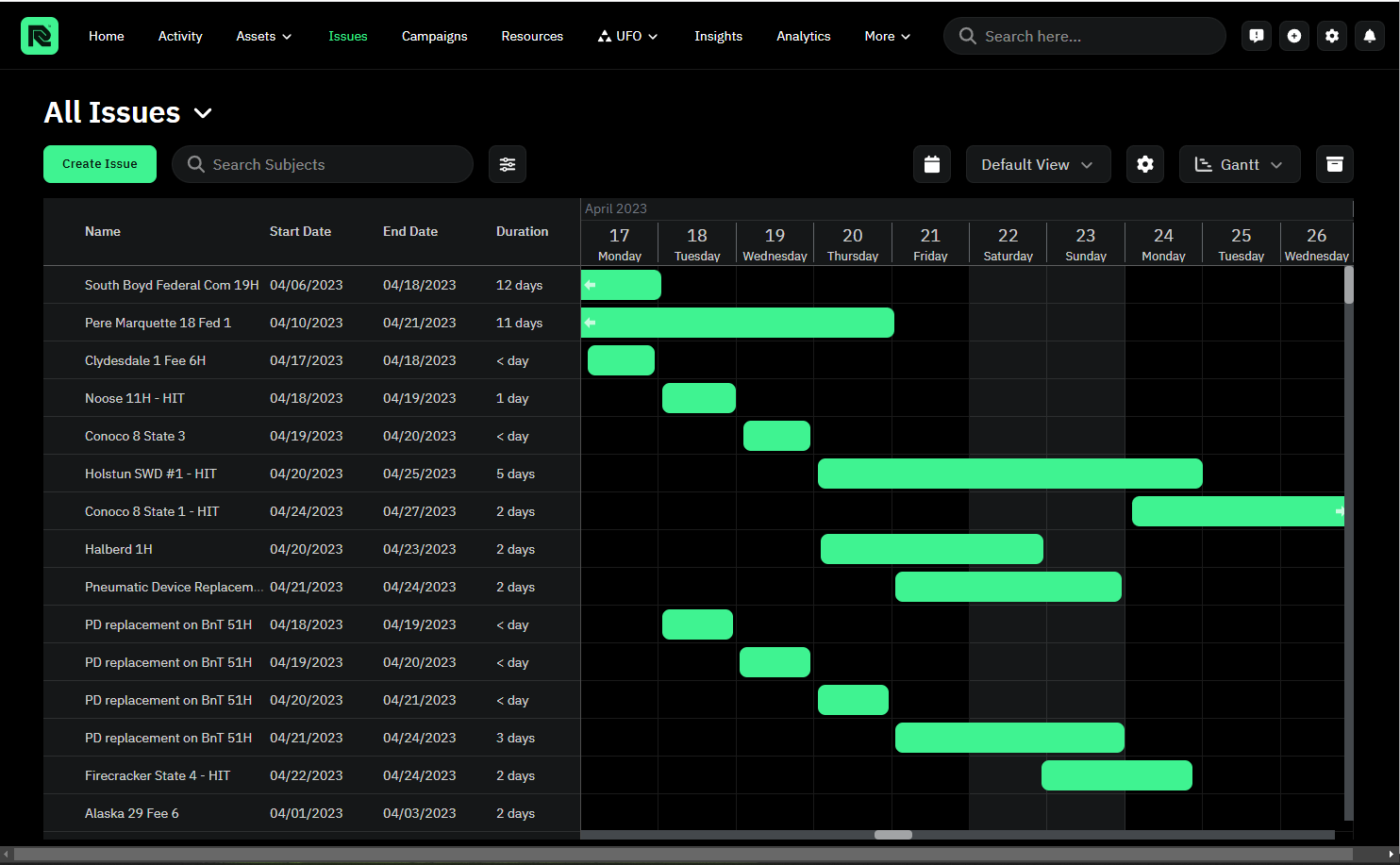
We are thrilled to unveil a groundbreaking feature that puts the power of dynamic scheduling in the hands of our Engineers – the all-new Gantt/Timeline View. Users can now visualize scheduled issues with a Gantt chart for Resources and Campaigns, as well as enjoying the freedom to dynamically adjust issue start/end dates, enhancing the overall scheduling experience.
What's New:
- Timeline-Gantt Chart View: Gain a comprehensive view of scheduled issues for Resources and Campaigns through an intuitive Gantt chart.
- Dynamic Date Adjustments: Seamlessly move start and end dates around directly within the Gantt chart, offering unparalleled flexibility in managing your schedules.
- Efficiency Redefined: Say goodbye to the cumbersome one-by-one adjustment process. With the Gantt/Timeline View Module, you have the power to make swift and dynamic changes in a single, user-friendly interface.
We can't wait for you to explore this feature and transform the way you plan and manage your resources.
Thank you for being a part of the ResNet community—where innovation meets efficiency!
- [ResNet For Field](https://support.resnet.ai/migration/resnet-for-field?hsLang=en)
- [ResNet For Office](https://support.resnet.ai/migration/resnet-for-office?hsLang=en#main-content)
- [Admin](https://support.resnet.ai/migration/resnet-for-office?hsLang=en#admin)
- [Home](https://support.resnet.ai/migration/resnet-for-office?hsLang=en#home)
- [Assets](https://support.resnet.ai/migration/resnet-for-office?hsLang=en#assets)
- [Issues](https://support.resnet.ai/migration/resnet-for-office?hsLang=en#issues)
- [Campaigns](https://support.resnet.ai/migration/resnet-for-office?hsLang=en#campaigns)
- [Resources](https://support.resnet.ai/migration/resnet-for-office?hsLang=en#resources)
- [Field Dispatch Console](https://support.resnet.ai/migration/resnet-for-office?hsLang=en#field-dispatch-console)
- [Gamification](https://support.resnet.ai/migration/resnet-for-office?hsLang=en#gamification)
- [Routes](https://support.resnet.ai/migration/resnet-for-office?hsLang=en#routes)
- [User Groups](https://support.resnet.ai/migration/resnet-for-office?hsLang=en#user-groups)
- [Credentials](https://support.resnet.ai/migration/resnet-for-office?hsLang=en#credentials)
- [Forms](https://support.resnet.ai/migration/resnet-for-office?hsLang=en#forms)
- [Admin Panel](https://support.resnet.ai/migration/resnet-for-office?hsLang=en#admin-panel)
- [Filtering](https://support.resnet.ai/migration/resnet-for-office?hsLang=en#filtering)
- [Custom Fields](https://support.resnet.ai/migration/resnet-for-office?hsLang=en#custom-fields)
- [Integrations](https://support.resnet.ai/migration/integrations?hsLang=en)
- [Release Notes](https://support.resnet.ai/migration/release-notes?hsLang=en#main-content)
- [Feature Releases](https://support.resnet.ai/migration/release-notes?hsLang=en#feature-releases)
- [FAQs](https://support.resnet.ai/migration/faqs?hsLang=en)
- [Onboarding](https://support.resnet.ai/migration/onboarding?hsLang=en#main-content)
- [Office](https://support.resnet.ai/migration/onboarding?hsLang=en#office)
- [Field](https://support.resnet.ai/migration/onboarding?hsLang=en#field)
- [Workflow Automation](https://support.resnet.ai/migration/workflow-automation?hsLang=en#main-content)
- [Build Integrations](https://support.resnet.ai/migration/workflow-automation?hsLang=en#build-integrations)
- [Ready-to-use-components](https://support.resnet.ai/migration/workflow-automation?hsLang=en#ready-to-use-components)
- [Example Workflows](https://support.resnet.ai/migration/workflow-automation?hsLang=en#example-workflows)
- [Documentation](https://support.resnet.ai/migration/documentation?hsLang=en)
[.jpg?width=6782&height=2762&name=primary_logo%20(1).jpg)](https://support.resnet.ai/?hsLang=en)
[mailto:email@email.com](mailto:email@email.com)
Copyright © 2026, ResNet AI